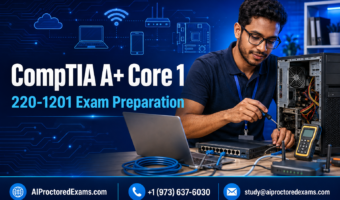
CompTIA A+ Core 1 (220-1201) Exam Preparation Course
About This Course
Prepare Confidently for the CompTIA A+ Core 1 220-1201 Exam
Build the technical knowledge and practical problem-solving skills required for the CompTIA A+ Core 1 certification exam with this comprehensive online course from AIProctoredExams. The CompTIA A+ Core 1 220-1201 exam preparation course provides structured lessons, realistic exam-style questions, performance-based question practice, detailed explanations, troubleshooting scenarios, and timed mock examinations.
Designed for aspiring IT support professionals, help desk technicians, field service technicians, and certification candidates, the course covers every major Core 1 domain. Learners can explore additional technology courses through the AIProctoredExams IT Certifications category or browse all available exam-preparation courses.
About the CompTIA A+ Core 1 Exam
CompTIA A+ is a vendor-neutral certification designed to validate foundational skills in computer hardware, mobile devices, networking, cloud technologies, and technical troubleshooting. Candidates must pass both Core 1 (220-1201) and Core 2 (220-1202) from the same exam series to earn the full CompTIA A+ certification.
The CompTIA A+ Core 1 220-1201 examination contains a maximum of 90 questions and allows 90 minutes for completion. Question formats may include multiple-choice questions, drag-and-drop items, and performance-based questions. Candidates need a passing score of 675 on a scale of 100–900. Review the latest information on the official CompTIA A+ certification page before scheduling your examination.
Mobile Devices — 13%
The mobile devices section covers laptop components, mobile-device accessories, connection methods, and device configuration. Students learn about laptop displays, batteries, storage, memory, wireless connections, docking stations, port replicators, and mobile-device synchronization.
The CompTIA A+ Core 1 220-1201 exam preparation course also explains how to configure smartphones, tablets, and laptops for wired and wireless environments. Troubleshooting exercises help learners diagnose common connectivity, power, display, and hardware problems affecting mobile devices.
Networking — 23%
Develop a clear understanding of networking concepts, protocols, ports, devices, and connection types. The course reviews TCP/IP, DNS, DHCP, HTTP, HTTPS, SSH, RDP, email protocols, and other services commonly encountered by IT support professionals.
Learners study routers, switches, wireless access points, modems, firewalls, patch panels, network interface cards, and Power over Ethernet. Lessons also address IPv4 and IPv6 addressing, wireless standards, network cabling, internet connection types, small office networks, and common network tools.
Hardware — 25%
The hardware domain focuses on desktop computers, components, peripherals, storage devices, and printers. Students examine motherboards, CPUs, RAM, power supplies, cooling systems, expansion cards, storage interfaces, and input/output devices.
You will learn how to select compatible components, assemble computer systems, configure storage, connect peripherals, and recognize common hardware specifications. Printer coverage includes laser, inkjet, thermal, impact, and multifunction devices, together with their maintenance requirements and common faults.
Virtualization and Cloud Computing — 11%
This section introduces virtual machines, hypervisors, cloud deployment models, and cloud service models. Learners review Infrastructure as a Service, Platform as a Service, Software as a Service, and desktop virtualization.
The CompTIA A+ Core 1 220-1201 exam preparation course also covers resource allocation, virtual machine requirements, cloud file synchronization, shared resources, rapid elasticity, measured services, and high availability. These concepts support candidates preparing to work in modern hybrid and cloud-enabled IT environments.
Hardware and Network Troubleshooting — 28%
Troubleshooting is the largest Core 1 domain. Students learn how to follow a structured troubleshooting process: identify the problem, establish a probable cause, test the theory, create an action plan, implement the solution, verify system functionality, and document the outcome.
Practice scenarios cover boot failures, overheating, storage faults, display problems, power issues, printer errors, slow systems, intermittent connections, incorrect IP configurations, and wireless connectivity failures. Learners also practice choosing appropriate diagnostic tools and determining the best next action in realistic support situations.
Performance-Based Question Preparation
Knowing technical definitions is not enough for the 220-1201 examination. Candidates must also apply their knowledge to practical situations. This course includes PBQ-style exercises involving network configuration, cable selection, hardware installation, component identification, and fault diagnosis.
Detailed explanations show why each solution is appropriate and why alternative choices may not resolve the problem. This approach helps learners strengthen both technical understanding and exam-question analysis.
Who Should Enroll?
The CompTIA A+ Core 1 220-1201 exam preparation course is suitable for beginners entering the technology industry, students pursuing entry-level IT certifications, help desk professionals, desktop support technicians, field service technicians, and candidates retaking the examination.
No advanced technical qualification is required. However, basic familiarity with computers and approximately 12 months of practical IT support experience can help learners understand the applied concepts more easily.
Prepare, Practice and Measure Your Progress
Begin by reviewing the AIProctoredExams study guides and following the instructions provided on the How It Works page. Complete each domain lesson, attempt the topic-based quizzes, and carefully study the detailed answer explanations.
Use timed practice examinations to improve pacing and identify weaker subjects. Additional examination tips and preparation resources are available on the AIProctoredExams blog. Candidates who need assistance can visit the Help Center or contact AIProctoredExams.
When ready to take the official examination, use the Pearson VUE CompTIA testing page to review scheduling information. Candidates planning to test remotely should also check the current CompTIA OnVUE testing requirements.
Start your CompTIA A+ Core 1 220-1201 exam preparation with organized study materials, practical exercises, and realistic exam-style practice. Learn more about the platform and its approach to exam preparation on the About AIProctoredExams page.
AIProctoredExams is an independent exam-preparation provider and is not affiliated with or endorsed by CompTIA. CompTIA and A+ are trademarks of CompTIA, Inc.
Learning Objectives
Material Includes
- * Complete CompTIA A+ Core 1 220-1201 Digital Study Pack
- * 300–500 Realistic CompTIA A+ Core 1 Practice Questions
- * 5 Sets of Timed Practice Quizzes and Full-Length Mock Exams
- * Performance-Based Question (PBQ) Simulations and Practical Scenarios
- * Detailed Answers and Explanations for Every Practice Question
- * Domain-Based Quizzes Covering All Five 220-1201 Exam Domains
- * Hardware, Networking, Ports and Protocols Quick-Reference Sheets
- * Step-by-Step Hardware and Network Troubleshooting Exercises
- * Structured Study Schedule, Progress Tracker and Exam-Day Checklist
- * Unlimited Course Access and Dedicated 24/7 Student Support
Material Includes
- * Complete CompTIA A+ Core 1 220-1201 Digital Study Pack
- * 300–500 Realistic CompTIA A+ Core 1 Practice Questions
- * 5 Sets of Timed Practice Quizzes and Full-Length Mock Exams
- * Performance-Based Question (PBQ) Simulations and Practical Scenarios
- * Detailed Answers and Explanations for Every Practice Question
- * Domain-Based Quizzes Covering All Five 220-1201 Exam Domains
- * Hardware, Networking, Ports and Protocols Quick-Reference Sheets
- * Step-by-Step Hardware and Network Troubleshooting Exercises
- * Structured Study Schedule, Progress Tracker and Exam-Day Checklist
- * Unlimited Course Access and Dedicated 24/7 Student Support